Quick answer
A GCLID (Google Click Identifier) is the gclid URL parameter Google Ads adds to your landing page when auto-tagging is on, tying a visit to the campaign and click behind it. GBRAID and WBRAID are privacy-preserving, aggregated alternatives Google uses for iOS traffic: GBRAID for web-to-app journeys, WBRAID for app-to-web.
Key takeaways
- GCLID identifies a single ad click; GBRAID and WBRAID measure conversions in aggregate and exist because of Apple's App Tracking Transparency rules on iOS 14 and later.
- Per Google's docs, GBRAID covers clicks on web ads that lead into an iOS app, WBRAID covers clicks on ads inside iOS apps that lead to a website, and Google now also recommends GBRAID for web offline imports when the GCLID may be dropped.
- Capture all three with hidden form fields and first-party storage, then save them on the lead record in your CRM next to the email and phone number.
- When importing, never send GBRAID and WBRAID on the same row, send GCLID and GBRAID together when you have both, and use a conversion action set to count Every conversion for braid rows.
- Imports only count if the click falls inside the conversion action's click-through window (1 to 90 days), so a sales cycle longer than your window loses credit.
On this page
- What is a GCLID?
- What are GBRAID and WBRAID?
- GCLID vs GBRAID vs WBRAID: when does Google use which?
- What does a Google click ID look like?
- How do you turn on auto-tagging in Google Ads?
- How to check if a GCLID is being passed
- GCLID vs UTM parameters: what's the difference?
- How do you capture GCLID, GBRAID and WBRAID in forms and your CRM?
- How do you import offline conversions with GCLID, GBRAID and WBRAID?
- Where do enhanced conversions for leads fit in?
- Why is the GCLID missing? Common problems and fixes
- FAQ
What is a GCLID?
A GCLID (Google Click Identifier) is a URL parameter Google Ads attaches to your landing page URL when someone clicks your ad and auto-tagging is on. Google defines it as a parameter that "identifies the campaign along with other attributes of the click," and it is the thread that ties a visit, a form fill or a sale back to the ad that caused it.
Three things depend on it:
- Website conversion tracking. The Google tag stores the GCLID in a first-party cookie and reads it back when the visitor converts. Google calls auto-tagging "required" for website conversion tracking.
- Google Analytics. The GCLID lets Google Analytics join Google Ads cost, campaign and keyword data to sessions.
- Offline conversion imports. When a lead turns into a booked job or a signed contract days later, you send the GCLID back to Google Ads with the outcome, and Smart Bidding learns which clicks produce revenue rather than just form fills.
That last use is where most lead-gen accounts win or lose. A plumber or HVAC company can get 100 form fills a month and 25 real jobs. If Google Ads only sees the 100, it optimizes for cheap form fills. If it sees the 25, it optimizes for paying clients. The GCLID is what makes that feedback loop possible (the full conversion setup is covered in our guide to Google Ads conversion tracking).
What are GBRAID and WBRAID?
GBRAID and WBRAID are privacy-preserving URL parameters that Google introduced in 2021 after Apple's App Tracking Transparency (ATT) policy took effect. Unlike a GCLID, they don't identify an individual click. Google says GBRAID "measures conversions in a non-unique fashion (like Campaign ID) without linking them to individual users or events."
Here is how Google's own documentation defines each one:
- GBRAID (
&gbraid=): present "when a user clicks on an ad on the web and is directed to your iOS app." Google introduced it in May 2021 to measure app conversions on iOS, and adds it to landing page URLs for iOS 14.5+ clicks when auto-tagging is on. The Google Ads API describes it as the parameter "for clicks associated with app conversions." - WBRAID (
&wbraid=): present "when a user clicks on an ad in an iOS app and is directed to your webpage." Google introduced it in March 2021, after it stopped sending the GCLID for iOS 14 traffic from a handful of Google apps. The API describes it as the parameter "for clicks associated with web conversions."
Watch out: several popular explainers have these two backwards. The quickest way to remember them is by where the conversion happens: GBRAID for app conversions, WBRAID for web (website) conversions. Both are case sensitive and must never be modified.
One newer twist: Google's help article on setting up offline conversions using GBRAID recommends capturing GBRAID for web campaigns too, when "the Google Click ID is at risk of being dropped." Google's import documentation now describes GBRAID as "used for aggregate measurement on iOS and Safari." In practice, app advertisers aren't the only ones who need GBRAID: a lead form on an ordinary website should capture it too.
GCLID vs GBRAID vs WBRAID: when does Google use which?
Google decides which parameter to append based on the device, the app or browser the click came from, and where the user lands. You don't choose. Your job is to accept and store whichever one arrives.
| GCLID | GBRAID | WBRAID | |
|---|---|---|---|
| URL parameter | gclid | gbraid | wbraid |
| Typical journey | Ad click to website, most devices and browsers | Web ad click to iOS app; also web conversions on iOS and Safari where the GCLID may be dropped | Ad click inside an iOS app to your website |
| Measurement level | Individual click | Aggregated, non-unique | Aggregated, non-unique |
| Introduced | Long-standing (auto-tagging) | May 2021 | March 2021 |
| Offline import | Yes | Yes, alongside GCLID when both exist | Yes, never together with GBRAID |
| Custom conversion variables | Supported | Not supported | Not supported |
| "One" conversion counting | Supported | Not supported | Not supported |
The practical takeaway: most clicks on desktop and Android still carry a GCLID. A meaningful share of iPhone traffic can arrive with GBRAID or WBRAID instead, or with a GCLID and a GBRAID together. If your forms only look for gclid, those iPhone leads show up in your CRM with no click ID and can never be imported.
What does a Google click ID look like?
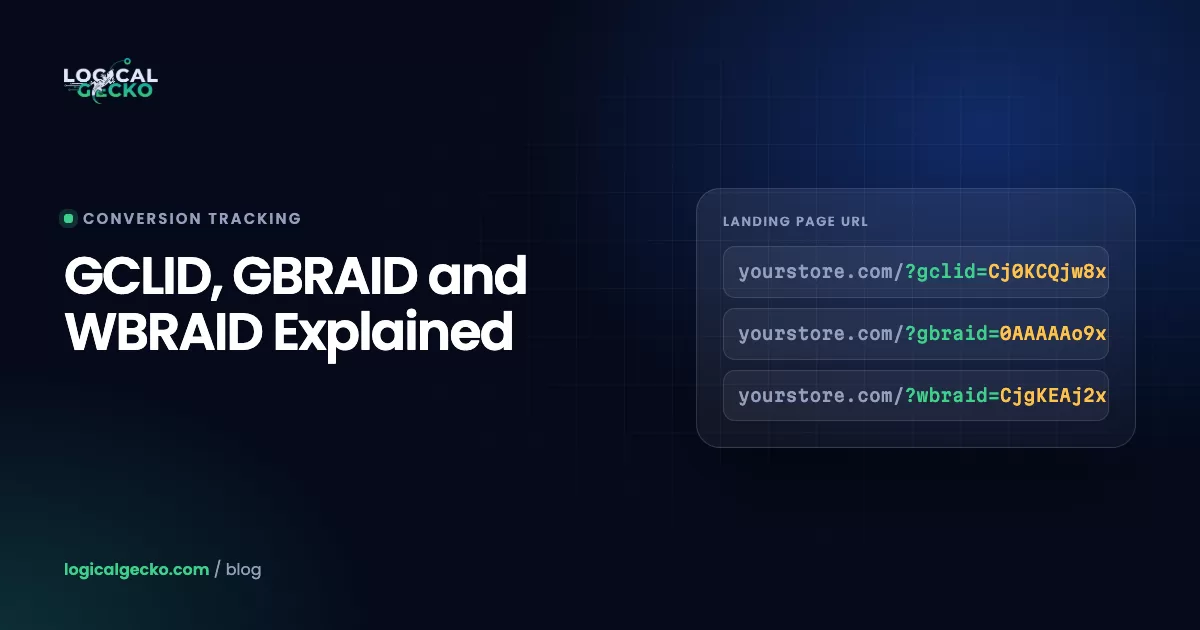
A Google click ID is a long string of letters, numbers, dashes and underscores appended to your URL after a ? or &. The sample GCLID in Google's own import template is EAIaIQobChMIlLfH1KqK9AIVvEocAh3BowKiEAoYAyAAEgKZSPD_BwE, which is 55 characters, but length varies. Here is what each parameter looks like on a landing page:
A few format facts matter when you store these values:
- They are case sensitive. Google says so explicitly for GCLID and GBRAID. A CRM or spreadsheet that changes case, trims or "cleans" the value breaks the import.
- They can't be decoded. Tools that claim to decode a GCLID can't reliably tell you the campaign or keyword. Google resolves the value on its side.
- They can sit next to other parameters. Your URL may also carry UTM tags,
gad_sourceorgclsrc. Your capture script should read the specific parameter by name, not assume it is the only one.
How do you turn on auto-tagging in Google Ads?
Auto-tagging is what makes Google append the GCLID, GBRAID or WBRAID, and it is on by default for new accounts. To check or change it:
- Open Admin. In Google Ads, click the Admin icon, then Account settings.
- Open Auto-tagging. Click the Auto-tagging section to see its status.
- Tick the box. Check "Tag the URL that people click through from my ad."
- Save. Then test a landing page as described in the next section.
Two exceptions to know about. If you use cross-account conversion tracking from a manager account, Google says you need to turn auto-tagging on in each child account manually. And "a small percentage of websites don't allow arbitrary URL parameters and serve an error page when auto-tagging is turned on." Google's auto-tagging help page covers both.
How to check if a GCLID is being passed
To check for a GCLID, add a test parameter to your landing page URL and confirm it survives to the final page unchanged. Google Analytics' troubleshooting guide uses ?gclid=TesTER-123 for exactly this.
- Load a test URL. Open a private window and visit
https://yoursite.com/landing-page?gclid=TesTER-123. Use your real final URL, including any path. - Check the address bar. After the page loads, the parameter should still be there with the same capitalization. If it disappeared, a redirect is stripping it.
- Check the cookie. In Chrome DevTools, open Application, then Cookies, and look for
_gcl_awon your domain. A real ad click writes it; some test values may not. - Check the form. Inspect your lead form and confirm the hidden
gclidfield holds the value, then submit a test lead and confirm it lands in the CRM record. - Repeat for braids. Run the same test with
?gbraid=test123and?wbraid=test123to prove your site and forms accept them too.
For real clicks, you can confirm a GCLID belongs to your account through the Google Ads API click_view report, which returns campaign and keyword details per GCLID for a single day at a time, up to 90 days back.
GCLID vs UTM parameters: what's the difference?
A GCLID is an opaque ID that Google fills in automatically and only Google can read. UTM parameters are plain-text labels you write yourself, so any analytics tool or CRM can read them. They do different jobs, and most accounts should run both.
| GCLID (auto-tagging) | UTM parameters (manual) | |
|---|---|---|
| Who sets it | Google, automatically on every click | You, in the final URL or tracking template |
| What it contains | Encoded click ID; details resolved by Google | Readable source, medium, campaign, term, content |
| Granularity | Click or impression level | Whatever you define, usually campaign or ad |
| Works for offline imports | Yes, it is the matching key | No, Google can't match a UTM to a click |
| Readable by your CRM | Stored, but meaningless without Google | Yes, useful for source reporting |
| Google Analytics 4 | Takes priority over manual tags | Used when no GCLID is present |
| Risk if misconfigured | Lost conversions and bidding signal | Messy or inconsistent reports |
The best setup keeps auto-tagging on for measurement and adds a simple UTM set through the account-level tracking template or final URL suffix, so your CRM can also report "google / cpc / campaign name" in plain English. Just don't expect UTMs to replace the GCLID for imports.
How do you capture GCLID, GBRAID and WBRAID in forms and your CRM?
You capture click IDs with a small script that reads them from the URL, saves them in first-party storage so they survive page views, and writes them into hidden form fields that your CRM stores on the lead. This is the same pattern Google documents for the GCLID, extended to the other two.
- Add three hidden fields to every lead form. Name them
gclid,gbraidandwbraid, for example<input type="hidden" name="gbraid" value="">. Google's GBRAID guide says to add the GBRAID field "alongside the GCLID." - Run a capture script on every page, not just landing pages. Visitors often browse before converting. Google's sample GCLID script reads the parameter, stores it in
localStoragewith a 90-day expiry, and fills the field on page load. It also only accepts a GCLID whengclsrcis absent or containsaw. Extend the same logic togbraidandwbraid. You can deploy it as a Custom HTML tag on All Pages in Google Tag Manager. - Don't overwrite a stored ID with an empty one. A return visit without a parameter should keep the earlier value. A new click with a new ID should replace it, so the import credits the most recent click.
- Create matching fields in the CRM. Add three single-line text fields to the contact or lead object and map each hidden field to them. In HubSpot, these are custom contact properties. In GoHighLevel, they are custom contact fields mapped from hidden form fields. In Salesforce, add them to the Lead object and carry them to the Opportunity on conversion so the value is there when the deal closes.
- Keep the values raw. Use text fields with room (255 characters), no formatting rules, no case changes and no trimming.
- Cover phone and chat leads too. Call tracking and chat tools need to pass the same IDs, or those leads stay unattributed.
Pro tip: Embedded forms and booking widgets loaded in an iframe (scheduling tools, some CRM form embeds) can't read your page's URL. Pass the stored IDs into the iframe's src as query parameters, or use the vendor's hidden-field feature, and test that they arrive.
This is the exact setup Logical Gecko builds for clients: all three identifiers on every lead form, stored on the contact record in the CRM, and fed back to Google Ads as qualified leads and closed jobs. If you would rather have it done for you, see our conversion tracking setup service.
How do you import offline conversions with GCLID, GBRAID and WBRAID?
You import offline conversions by sending Google Ads each outcome (for example "Qualified lead" or "Job booked") with the click ID, the conversion action name, a timestamp with a time zone, and optionally a value. Google then credits the campaign, keyword and click behind it. The rules below come straight from Google's API documentation and error reference, and they apply however you upload.
- Never put GBRAID and WBRAID on the same row. The API rejects it with
GBRAID_WBRAID_BOTH_SET: "Use only 1." - Send GCLID and GBRAID together when you have both. Google's current docs say "we recommend setting both the GCLID and GBRAID onto the conversion." Older guides that say "only one identifier per row" are out of date on this point.
- If you only have a WBRAID or only a GBRAID, send it. Braid-only rows are valid. Google says BRAIDs "should be added whenever available."
- Set the conversion action's count to "Every." Conversion actions that count "One" per click can't be used with GBRAID or WBRAID. Use an order ID to prevent duplicates instead.
- Leave out custom conversion variables on braid rows. Google Ads doesn't support them with GBRAID or WBRAID.
- Wait 6 hours. Rows fail if the click happened less than 6 hours ago, and Google says to wait 4 to 6 hours after creating a new conversion action before uploading to it.
- Populate consent. Google calls the
consentfield "highly recommended"; without it, "it's possible that your conversions won't be attributable."
What is the time limit for importing offline conversions?
An imported conversion only counts if its click falls inside the conversion action's click-through conversion window, which you can set from 1 to 90 days (30 days by default). Rows whose click is older fail with an EXPIRED_EVENT error. So if your sales cycle runs 60 days, set the window to at least 60 before those deals close, because window changes only apply going forward.
Your upload method adds a second limit. Google Ads Data Manager looks back 90 days on every run for file-based sources (Google Sheets, SFTP, HTTP, Cloud Storage, Amazon S3). For Salesforce and HubSpot connections, it imports the last 14 days on the first run and then only changes since the last run. For BigQuery, Redshift, Snowflake, MySQL and PostgreSQL, it imports the last 14 days every run. Imported conversions are reported on the date of the original ad interaction (Google specifies the impression date of the click), not the date you upload them.
API users: Google says that starting June 15, 2026, offline conversion imports and enhanced conversions for leads uploads move to the Data Manager API and are blocked in the Google Ads API, except for developer tokens allowlisted for legacy access. The Data Manager API accepts gclid, gbraid and wbraid as ad identifiers.
Where do enhanced conversions for leads fit in?
Enhanced conversions for leads is Google's upgraded offline import. Along with click IDs, you send hashed first-party data such as email and phone, which Google matches to signed-in Google accounts. It fills gaps click IDs can't, such as a lead whose GCLID never made it into the CRM. It complements click IDs rather than replacing them.
Google is explicit that you should keep sending both. Its enhanced conversions for leads guide tells you to "include GCLIDs with your uploaded events whenever possible," to add GBRAID and WBRAID "whenever available," and to send every user identifier you have. Since April 2026, enhanced conversions for web and for leads are a single on/off setting in Google Ads.
Click IDs (GCLID, GBRAID, WBRAID)
- Captured from the landing page URL
- Match to a specific click or aggregate group
- Lost if a redirect, iframe or form drops them
- No personal data involved
Enhanced conversions for leads
- Hashed email, phone or address from the form
- Matched to signed-in Google accounts
- Recovers leads with a missing click ID
- Requires accepting Google's data terms for enhanced conversions
Why is the GCLID missing? Common problems and fixes
When leads reach your CRM without a click ID, the cause is almost always one of the issues below. Work through them in order.
| Problem | What happens | Fix |
|---|---|---|
| Redirects strip parameters | An http-to-https, www or trailing-slash redirect drops the query string | Preserve query strings on every redirect and use the final URL in ads. Google says redirects and click trackers must pass the GCLID to the landing page. |
| Site rejects arbitrary parameters | An error page or a stripped URL when gclid, gbraid or wbraid is added | Allow unknown query parameters. Google lists this for both iOS parameters and GBRAID setup. |
| Consent denied | With consent mode's ad_storage denied, click info isn't stored in cookies such as _gcl_aw and _gcl_gb | Enable URL passthrough (gtag('set', 'url_passthrough', true), or "Enable linking on all page URLs" in the Conversion Linker) so click info travels between same-domain pages. Have your own capture script respect the visitor's choice. |
| Cross-domain journeys | The ad lands on one domain, the form or checkout lives on another, and the ID stays behind | Configure the Google tag's cross-domain linker for your domains, and pass stored IDs to the second domain's form. |
| Iframe forms | An embedded form can't read the parent page URL | Pass IDs into the iframe URL or use the vendor's hidden-field option. |
Only gclid captured | iOS leads arrive with GBRAID or WBRAID and are dropped | Capture all three parameters and fields. |
| CRM alters the value | Import fails as unparseable | Store raw text, with no case changes, trimming or length caps. |
| Auto-tagging off in a child account | No IDs at all on that account's clicks | Turn auto-tagging on in each account when using cross-account tracking. |
A note on cookies. Google lists _gcl_aw and _gcl_gb (and the server-side FPGCLAW and FPGCLGB) as Google Ads cookies with a 90-day lifetime, set on your own domain by the Google tag or the Conversion Linker tag. They are what lets the Google tag attribute on-site conversions. They don't put IDs into your CRM, though. That still needs your hidden fields.
Consent is where many setups quietly break. If you serve visitors in states or countries with opt-in rules, your banner decides whether those cookies exist at all. A correct Consent Mode v2 setup keeps you compliant while preserving as much measurement as the visitor's choice allows.
Quick audit checklist
- Auto-tagging is on in every account that serves ads
- A test URL with
?gclid=TesTER-123keeps the parameter intact on the final page - Every lead form has hidden
gclid,gbraidandwbraidfields that fill correctly - The CRM stores all three as raw text on the lead or contact
- Offline conversion actions count "Every" and have a click-through window longer than your sales cycle
- Imports include hashed email and phone, consent status and an order ID
If your CRM shows plenty of leads but Google Ads shows few imported conversions, a missing click ID is the usual cause. A free Google Ads audit from Logical Gecko checks this chain end to end. For home-service accounts, where most revenue happens on the phone and in the field, this loop is what our HVAC Google Ads and plumbing Google Ads campaigns run on.
Frequently asked questions
What does GCLID stand for?
GCLID stands for Google Click Identifier, sometimes written as Google Click ID. It is the value of the gclid parameter that Google Ads appends to your final URL when auto-tagging is turned on. The related identifiers are GBRAID and WBRAID, which Google uses for privacy-restricted iOS traffic, and DCLID, which belongs to Google Marketing Platform products such as Campaign Manager 360 and Display & Video 360.
What is GCLID used for?
The GCLID is used to connect an ad click to what happens next. The Google tag reads it to attribute website conversions, Google Analytics uses it to join Google Ads cost and campaign data to sessions, and offline conversion imports use it to credit a sale or qualified lead in your CRM back to the exact click. Without it, Google Ads cannot match most imported conversions to campaigns.
Is a GCLID unique to each click?
Usually, but not always. Google's auto-tagging documentation says a GCLID is sometimes created at the time of an impression rather than a click, and if the same person clicks the same ad again, the same GCLID is reused. So treat the GCLID as the key for an ad interaction, not as a unique ID for a person or a guaranteed one-to-one match with clicks in your reports.
Can you decode a GCLID?
No. A GCLID is an opaque, encoded value that only Google can resolve, so online "GCLID decoders" cannot reliably reveal the campaign or keyword. To see what a GCLID belongs to, query the click_view report in the Google Ads API, which returns campaign, ad group and keyword details per GCLID for one day at a time, up to 90 days back.
How long is a GCLID?
Google does not publish a fixed length, and the value varies. The sample GCLID in Google's own import template is 55 characters. Store it in a plain text field with plenty of headroom, such as 255 characters, and never trim, uppercase or lowercase it, because GCLID, GBRAID and WBRAID values are all case sensitive and an altered value will fail to import.
How long does the GCLID cookie last?
Google lists the _gcl_aw and _gcl_gb cookies, and their server-side counterparts FPGCLAW and FPGCLGB, as Google Ads cookies with a 90-day lifetime. They are set on your own domain by the Google tag or the Conversion Linker in Google Tag Manager, and they are not written when consent mode's ad_storage is denied.
Why am I seeing gbraid instead of gclid in my URLs?
Seeing gbraid or wbraid in place of gclid means the click came through a journey Google measures in aggregate on iOS, for example from certain Google apps under Apple's App Tracking Transparency rules. It is expected behavior, not a broken setup. Make sure your site accepts arbitrary URL parameters and that your forms capture gbraid and wbraid as well as gclid.
Sources15 references
- Google Ads Help: Google Click Identifier (GCLID): Definition
- Google Ads Help: About auto-tagging
- Google Ads Help: Updates to iOS 14 campaign measurement
- Google Ads Help: GBRAID URL parameter
- Google Ads Help: Set up offline conversions using GBRAID
- Google Ads Help: Set up offline conversions using Google Click ID (GCLID)
- Google Ads Help: Configure the Google tag for enhanced conversions for leads
- Google Ads Help: About conversion windows
- Google Ads Help: How Google Ads tracks website conversions
- Google Ads API: Manage offline conversions (ClickConversion fields)
- Google Ads API: ConversionUploadError reference
- Google Ads API: click_view resource
- Google Tag Platform: Set up consent mode (URL passthrough)
- Google Business Safety: How Google uses cookies in advertising
- Google Analytics Help: Missing Google Ads data in Google Analytics property