Quick answer
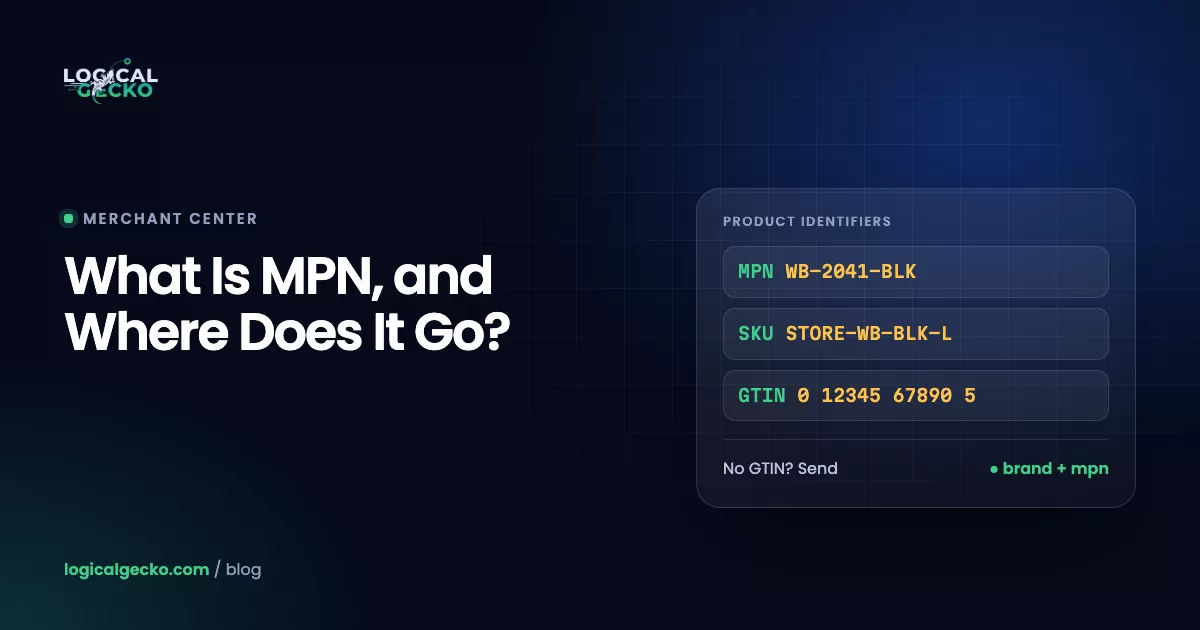
MPN stands for Manufacturer Part Number: the code a manufacturer gives one exact product to tell it apart from everything else that brand makes. It can mix letters, numbers and dashes, and it appears on labels, packaging and spec sheets. Google Merchant Center requires brand plus MPN for any product that has no GTIN.
Key takeaways
- An MPN (Manufacturer Part Number) is the code a manufacturer assigns to one exact product, and it only has to be unique within that manufacturer's catalog, so it always travels with the brand name.
- The manufacturer assigns the MPN, you assign the SKU, and the brand owner licenses the GTIN behind a UPC or EAN barcode from GS1, so a product keeps one MPN and one GTIN at every store but has a different SKU at each.
- Google Merchant Center requires the mpn attribute only for products without a manufacturer-assigned GTIN, accepts 1 to 70 characters, and disapproves products sent with an incorrect MPN.
- Each color or size variant usually needs its own MPN, except apparel sizes, which often share one MPN and are told apart with the size attribute.
- If you make a product or sell it under your own store brand and it has no assigned MPN, Google lets you use a unique code of your choice, such as your SKU, together with your store brand.
On this page
- What is an MPN?
- MPN vs SKU vs GTIN vs model number: what is the difference?
- Where do you find a product's MPN?
- When does Google Merchant Center require an MPN?
- What are the mpn attribute rules and format limits?
- How does identifier_exists work with an MPN?
- Should you create your own MPN for private label products?
- Which MPN mistakes cause Merchant Center issues?
- Where do you add an MPN in Shopify, WooCommerce or a feed?
- Does a correct MPN help your Shopping ads?
- FAQ
What is an MPN?
An MPN, or Manufacturer Part Number, is the code a manufacturer assigns to one specific product so it can be told apart from everything else that brand makes. Google's mpn attribute page puts it precisely: MPNs identify a specific product among all products from the same manufacturer.
That last part matters. An MPN is unique inside one brand's catalog, not across the world, and two unrelated companies could both use a code such as 100-2. That is why Google asks for brand and MPN as a pair.
There is no global format. Each manufacturer builds its own scheme from letters, numbers and dashes, and no central body issues MPNs the way GS1 licenses GTINs. On a label or spec sheet it may read MPN, P/N, Part No., Mfr. Part # or Model No.
The same three letters mean other things. In US student loans, the MPN is the Master Promissory Note you sign with the Department of Education. In medicine, it is short for myeloproliferative neoplasm, a group of blood cancers. This guide covers the product meaning, the one eBay and Google Merchant Center ask for when you list an item.
MPN examples
The first four rows are Google's own sample values from its help pages; the last is an illustrative code a brand might create for its own line.
| Product | MPN | What it shows |
|---|---|---|
| Google's sample product in the mpn spec | GO12345OOGLE | Letters and numbers mixed, no fixed length |
| Google's sample t-shirt, green, small | 00638HAY | One color, one MPN |
| The same t-shirt, blue, small | 00638NIC | A new color gets a new MPN |
| The same t-shirt, yellow, small | 00638ANG | A shared stem with a different ending per color |
| Illustrative store-brand water bottle, 24 oz, black | NB-WB24-BLK | A code a brand owner builds for its own line |
MPN vs SKU vs GTIN vs model number: what is the difference?
The manufacturer assigns the MPN. You assign the SKU. The brand owner licenses the GTIN, the number behind a UPC or EAN barcode, from GS1. A model number names a product design, and a serial number names one single unit. Only the GTIN is unique worldwide; the MPN is unique within one brand.
| Identifier | Who assigns it | What it identifies | Unique across | Format | Merchant Center field |
|---|---|---|---|---|---|
| MPN | The manufacturer | One product or configuration | That manufacturer's catalog | Letters, numbers, dashes; 1 to 70 characters in a feed | mpn |
| SKU | You, the seller | An item in your own inventory | Your store only | Any format you choose | Google suggests it for id |
| GTIN (UPC, EAN) | The brand owner, licensed from GS1 | One trade item | The whole world | 8, 12, 13 or 14 digits only | gtin |
| Model number | The manufacturer | A product design or family | That manufacturer's catalog | Varies | No field of its own; use it in the title |
| Serial number | The manufacturer | One physical unit | Every single unit | Varies | Never sent |
The GTIN side of this table, including UPC vs EAN and how to license real barcodes, is covered in our guide to what a GTIN is and how Google uses it. Here we stay with the MPN.
MPN (the maker's code)
- Set by the manufacturer
- Same at every store that sells the product
- Printed on the label or spec sheet
- Goes in the mpn field, paired with brand
SKU (your code)
- Set by you
- Different at every store
- Lives in your inventory system
- Goes in id, not in mpn, for another brand's product
Is a manufacturer part number the same as a model number?
Sometimes. For a simple product sold in one version, the model number and the MPN are often the same code. When a model comes in several colors, sizes or capacities, the part number is usually the more specific of the two.
Apple's support pages show the split well. Apple lists a single US model number, A3472, for the iPhone 18 Pro, which comes in four capacities and four colors. And on the phone itself, in Settings › General › About, the value next to "Model Number" is the part number; you tap it to see the model number. For a Merchant Center feed, the specific code is the one that matters, because Google asks for a separate MPN for each color and size variant.
MPN vs UPC
A UPC is a 12-digit GTIN, made only of digits and printed under the barcode. An MPN is free-form text set by the maker. Both come from the manufacturer, so Google notes that two retailers selling the same product send identical identifiers.
Where do you find a product's MPN?
Look on the product, its packaging or its spec sheet first, then ask the manufacturer or your supplier. Google's unique product identifier guidance names the packaging and the manufacturer as the most accurate sources and tells you never to approximate a value.
- Check the label and the box. Look near the model name for MPN, P/N, Part No. or Mfr. #. Appliances often print it on a rating label.
- Open the manual or spec sheet. Datasheets and installation guides list the full part number, often with a suffix for color, size or region.
- Search the manufacturer's website. Product pages and dealer catalogs usually list the part number for each variant.
- Ask your supplier, then check the answer. Supplier price lists and invoices often carry part numbers. Google says to use MPNs assigned by the manufacturer, not by a reseller or distributor, so confirm the code matches the maker's own catalog and carries no distributor prefix.
- Leave the field blank if you can't confirm it. Google's mpn page says to provide an MPN only if you are sure it is correct, and when in doubt, not to provide one.
Don't copy an MPN from another seller's listing or a similar product. Google's identifier guidance says not to make up, guess or reuse values from similar products, and its product data specification says a product submitted with an incorrect MPN will be disapproved. A blank field is safer than a wrong one.
When does Google Merchant Center require an MPN?
Google Merchant Center requires the mpn attribute only when a product has no manufacturer-assigned GTIN. In that case you send brand plus MPN, and together they identify the product. For every other product the MPN is optional, though Google recommends sending brand and MPN whenever you have them.
The product data specification lists mpn as "Required (Only if your product does not have a manufacturer assigned GTIN)" and optional for all other products. Google's identifier guidance adds a warning in the other direction: products that have a brand and MPN but are submitted without them may have limited visibility.
Some products need a specific MPN choice. Google's pages on MPN, brand and unique product identifiers spell them out:
| Situation | Which MPN Google wants |
|---|---|
| Colors and sizes of one product | A separate MPN for each variant. Apparel sizes are the exception: all sizes often share one MPN, and the size attribute tells them apart. |
| A bundle the manufacturer created | The bundle's own MPN |
| A bundle you created, such as a camera with a lens and bag | The main product's MPN (the camera) |
| A multipack the manufacturer created | The multipack's own MPN |
| A multipack you created | The single item's MPN |
| A compatible or refurbished third-party product, such as a compatible ink cartridge | The MPN of the company that built it, never the original equipment maker's part number |
| A store brand or private label product with no MPN | A unique code of your choice, such as your SKU, with your store brand |
If you are still setting up your account, our explainer on what Google Merchant Center is shows where product data fits in, from the feed to free listings and Shopping ads.
What are the mpn attribute rules and format limits?
The mpn attribute takes one text value of 1 to 70 characters, built from letters and numbers, with plain ASCII recommended. It must be the manufacturer's code, it must be correct, and it must match the exact variant you sell.
| Specification | Google's rule for mpn |
|---|---|
| Technical name | mpn |
| Type | String: alphanumeric, Unicode allowed, ASCII only recommended |
| Length | 1 to 70 characters |
| Repeated field | No: one MPN per product |
| Schema.org property | Product.mpn |
| Text feed example | GO12345OOGLE |
| XML feed example | <g:mpn>GO12345OOGLE</g:mpn> |
These content rules decide whether a product is approved:
- Use the manufacturer's MPN. Google's words: unless you're the manufacturer, don't use a value that you've created.
- Send it only when you are sure. An incorrect MPN gets the product disapproved, per the product data specification.
- Match the variant. Different colors of a product should have different MPNs. Google calls this using the most specific MPN possible.
- Pair it with brand. The brand attribute also takes 1 to 70 characters and should be the brand name people recognize on the product.
- Keep store codes out. For a product someone else makes, Google says not to put internal SKUs or other store-specific values in gtin, brand or mpn.
brand + mpn (for example, Google + GO12345OOGLE)Google maps the mpn attribute to the schema.org Product.mpn property, so the code in your product page's structured data should match the code in your feed.
How does identifier_exists work with an MPN?
The identifier_exists attribute tells Google that a product has no unique identifiers. If you leave it out, Google treats the value as yes. Set it to no only when a new product truly lacks them, such as a custom, handmade or vintage item.
The product data specification says when no applies, and it depends on the category:
- Media items: the GTIN is unavailable (ISBN and SBN codes count as GTINs).
- Apparel: the brand is unavailable.
- Everything else: the product has no GTIN and no combination of MPN and brand.
Three details trip stores up. If you set no, still send the identifiers you do have. If a product does have identifiers, a value of no can get it disapproved, and Google's identifier_exists page says products marked no despite evidence of an identifier get a warning. And the value must be in English: yes, true, no or false in text and XML feeds, and true or false in the Merchant API.
identifier_exists no, or your own MPN?
Google gives two routes for goods you make yourself. Its identifier_exists page uses a customized dress and a hand-knitted scarf as examples for no. Its brand page says that when you are the manufacturer and only seller of a product with no official brand, you should use your store name as the brand and include an MPN of your choice instead of setting identifier_exists to false.
Our rule of thumb: a product line you restock gets your store brand plus your own MPN, and a true one-off piece made to order gets identifier_exists set to no. Our GTIN guide has a full identifier table for custom, vintage and bundled products.
Should you create your own MPN for private label products?
Yes, if your brand is on the product and it has no MPN from the factory. Google's guidance for store brand and private label products is to put a unique identifier of your choice, for example your SKU, in the mpn field, and your store brand in brand. Never create an MPN for a product sold under someone else's brand.
Google defines private label products as goods made by one company and relabeled by the company selling them. The product is sold under your brand, so you act as the manufacturer for identifier purposes. If you have also licensed GS1 GTINs for your line, send both: Google's own example of a store-brand couch carries a GTIN and an MPN.
Google sets the first two rules below; the rest are what we use on client catalogs so the codes still work years later:
- One MPN per sellable variant (each color, size or capacity), with apparel sizes as Google's allowed exception
- 70 characters or fewer, using plain letters, digits and hyphens
- Never reused: a retired MPN stays retired, even when a new product replaces it
- Stable: once a product is live, the MPN does not change
- Printed on the packaging or spec sheet, and the same value on your site, Google feed and eBay listings
- If your SKU already follows these rules, use the SKU as the MPN, as Google suggests
Worked example: a 12-variant private label line
For example, a store selling its own brand of insulated water bottles in 3 sizes (18, 24 and 32 oz) and 4 colors has 12 variants, so it needs 12 MPNs. The bottles have no GTINs yet. Using a pattern of brand code, product code with size, and color, the feed looks like this (illustrative values):
| Variant | id (SKU) | item_group_id | brand | mpn | gtin |
|---|---|---|---|---|---|
| 18 oz, black | NB-WB18-BLK | NB-WB | Your store brand | NB-WB18-BLK | Blank |
| 18 oz, white | NB-WB18-WHT | NB-WB | Your store brand | NB-WB18-WHT | Blank |
| 24 oz, black | NB-WB24-BLK | NB-WB | Your store brand | NB-WB24-BLK | Blank |
| 32 oz, sage | NB-WB32-SGE | NB-WB | Your store brand | NB-WB32-SGE | Blank |
| 8 more variants | Same pattern | NB-WB | Your store brand | Same pattern | Blank |
Each MPN is 11 characters, well under the 70-character limit. All 12 variants share one item_group_id, which Google suggests filling with the parent SKU. If the line later needs barcodes for retail or marketplaces, the brand can license GTINs and add them in the gtin column while keeping the same MPNs.
Which MPN mistakes cause Merchant Center issues?
Most MPN problems come from five habits: guessing, using the wrong company's code, reusing one MPN across variants, leaving identifiers blank, and marking identifier_exists no on products that have identifiers. Each has its own issue name in Merchant Center.
| Mistake | What Merchant Center shows | How to fix it |
|---|---|---|
| A guessed MPN, or one copied from a similar product | Incorrect MPN: a warning, and the product may be disapproved for ads or free listings | Send the maker's MPN, or clear the field if the product has none |
| A distributor code, or your own SKU, on another brand's product | Incorrect MPN or Invalid MPN | Replace it with the manufacturer's MPN; reseller and distributor codes don't count |
| One MPN copied to every color | Duplicate identifier | Give each variant its own MPN; apparel sizes may share one, told apart by size |
| Variants with the same brand and MPN but different group IDs | Same brand and MPN but differing item group ID | Use one consistent item_group_id for all of them |
| No GTIN, and no brand plus MPN | Missing or incorrect GTIN; WooCommerce labels it Limited performance due to missing identifiers | Add a brand and either a GTIN or an MPN, or set identifier_exists to no for custom and vintage goods |
| The original maker's part number on a compatible product | Disapproval under Google's compatible product rules | Send the brand and MPN of the company that built it |
| identifier_exists set to no on a product that has an MPN | A warning when Google finds evidence of an identifier, and possible disapproval | Remove the no and send the identifiers |
| Shoes, sunglasses, handbags or watches sent with brand only | Missing brand (these subcategories also need a GTIN or an MPN) | Add the GTIN or MPN alongside the brand |
The issue names come from Google's fix pages for Incorrect MPN, Invalid MPN, Duplicate identifier, Same brand and MPN but differing item group ID, Missing or incorrect GTIN and Missing brand.
To fix many products at once, follow Google's bulk method:
- Open Products › Needs attention. Use the filter icon to show only the MPN issue you are fixing.
- Download the affected products. The download icon exports a CSV of every product with that issue.
- Correct the values at the source. Fix the MPN in your store or feed file. In our experience, an edit made only in Merchant Center gets overwritten by the next sync from Shopify or WooCommerce.
- Re-upload or resync, then wait. Google says changes to Invalid MPN issues may take 24 to 72 hours to show on the Needs attention page.
Shopify warns that incorrect identifiers can keep products from publishing and can put the account at risk of suspension. If identifier issues sit next to a suspension notice, our Merchant Center suspension recovery team can check whether product data is part of the cause.
Where do you add an MPN in Shopify, WooCommerce or a feed?
The MPN goes in the field your Google connection reads: the Google & YouTube app in Shopify, the Google for WooCommerce tab in WooCommerce, or an mpn column in a feed file. It does not go in the SKU or barcode field.
Shopify
Shopify's Google & YouTube channel requirements say that products without a GTIN need an MPN and a brand added in the Google & YouTube channel. Google's Shopify sync guide gives the path:
- Open the app. In Shopify admin, go to Sales channels › Google & YouTube, then Products › All products.
- Select products and open the bulk editor. Check the products you want to update and choose Edit in bulk editor.
- Fill in MPN and brand, then save. For variants, open the product and use its Variants section, since each color or size needs its own MPN.
- Mark true custom products. If a product has no GTIN or MPN because it is custom, check This is a custom product.
Don't type an MPN into Shopify's SKU or barcode fields to clear a warning; the variant's barcode field is where Shopify keeps the GTIN. If you run ads on the same catalog, our guide to Google Ads for Shopify covers how this product data feeds your campaigns.
WooCommerce
With the Google for WooCommerce extension, open a product and go to the Google for WooCommerce tab in the Product data box. Set GTIN, MPN and brand there, or use attribute mapping to fill them for a whole category. WooCommerce's Google for WooCommerce error guide gives two recipes:
- Branded products: the GTIN from the packaging, the manufacturer-assigned MPN (blank if there is none) and the brand, such as Adidas.
- Custom or handmade products: GTIN blank, your WooCommerce SKU as the MPN, and your domain name (without https://www.) as the brand.
A product feed file
In a CSV or TSV feed, add a column named mpn next to brand. In XML, use <g:mpn>NB-WB24-BLK</g:mpn>. The field is not repeated, so each product row gets exactly one MPN. Integrations built on the Merchant API send the same attribute. Our step-by-step guide to Google Merchant Center setup covers adding a feed or connecting a store for the first time.
eBay
eBay's product identifier guide lists MPN among the identifiers it asks for and requires identifiers in most categories. If an item has none, such as an antique, you can select Does not apply. Use the same MPN on eBay that you send to Google.
Does a correct MPN help your Shopping ads?
Yes, and for products without a GTIN it is how Google knows what you sell. Shopping ads and free listings have no keywords, so Google reads your product data, and it says unique product identifiers help match search queries with your products.
Part-number searches are a clear case. Google notes that people sometimes search for a specific MPN, and someone replacing a filter, cartridge or charger often types the exact code. A correct MPN lets your listing match that search. Identifiers also help Google verify new offers: when it can't match a product to similar offers, Google's Not enough information to verify value [price] issue takes the offer down until you add a GTIN, brand or MPN.
For how product data turns into bids and placements, see our guide to Google Shopping ads. If your Needs attention tab lists identifier issues across hundreds of products, our Merchant Center management service fixes product data at the source so the fixes survive the next sync.
Frequently asked questions
What does MPN stand for?
In retail and eCommerce, MPN stands for Manufacturer Part Number, the code a maker assigns to one specific product. The same letters mean other things elsewhere. In US student loans, MPN is the Master Promissory Note you sign with the Department of Education, and in medicine it is short for myeloproliferative neoplasm, a group of blood cancers. On a product label, an eBay listing or a Google product feed, MPN means the part number.
Is an MPN the same as a SKU?
No. The manufacturer assigns the MPN, and it stays the same at every store that sells the product. You assign the SKU for your own inventory, so ten stores can sell the same item under ten different SKUs. There is one overlap: for a product you make or sell under your own store brand that has no MPN, Google says you can use your SKU as the MPN.
Is the MPN the barcode number?
No. The number under a retail barcode is a GTIN, which in the US is usually a 12-digit UPC made only of digits. An MPN can contain letters, numbers and dashes, and it is usually printed as text near the product name, often labeled P/N or Part No. Many products carry both, and Google wants both in your feed when they exist.
Is the MPN the same as a serial number?
No. An MPN identifies a product or configuration, so every unit of that product shares it. A serial number identifies one physical unit, so no two units share it. Warranty claims use the serial number, while listings and Google product feeds use the MPN. Never put a serial number in the mpn field, because it describes one item, not the product you sell again and again.
What does MPN mean on eBay?
On eBay, MPN means Manufacturer Part Number, one of the product identifiers eBay uses to match your listing to its product catalog. eBay requires product identifiers in most categories, and when it finds a catalog match it fills in details such as the photo and title. If your item has no identifier, such as an antique, eBay lets you select Does not apply instead of typing a code.
Can I make up my own MPN?
Only for products you make or sell under your own brand. Google's rule is to use the MPN the manufacturer assigned and, unless you are the manufacturer, not to use a value you created. For a store brand or private label product with no assigned MPN, Google asks for a unique code of your choice, such as your SKU, plus your store name as the brand. An invented MPN on another company's product risks disapproval.
What if my product has no MPN?
Leave the mpn field blank instead of guessing. If the product has a GTIN, send it with the brand and Google has what it needs. If it has neither, because it is custom made, handmade or vintage, set identifier_exists to no. If you make the product yourself and restock it, Google's brand guidance prefers your store name as the brand plus an MPN of your choice.
Is MPN required for Google Shopping?
Only when the product has no manufacturer-assigned GTIN. Google's product data specification lists mpn as required in that case and optional for every other product. Google still recommends sending brand and MPN for all products when you have them, because products that have these identifiers but are submitted without them may get limited visibility in ads and free listings.
Sources20 references
- Google Merchant Center Help: MPN [mpn]
- Google Merchant Center Help: About unique product identifiers
- Google Merchant Center Help: Product data specification
- Google Merchant Center Help: Identifier exists [identifier_exists]
- Google Merchant Center Help: Brand [brand]
- Google Merchant Center Help: How to fix: Incorrect MPN
- Google Merchant Center Help: How to fix: Invalid MPN
- Google Merchant Center Help: How to fix: Same brand and MPN but differing item group ID
- Google Merchant Center Help: How to fix: Duplicate identifier
- Google Merchant Center Help: How to fix: Missing or incorrect GTIN
- Google Merchant Center Help: How to fix: Missing brand
- Google Merchant Center Help: How to fix: Not enough information to verify value [price]
- Google Merchant Center Help: Syncing your products (Google & YouTube app on Shopify)
- Shopify Help Center: Google & YouTube channel requirements
- WooCommerce Docs: How to resolve common Google for WooCommerce errors
- eBay Seller Center: Product identifiers
- Apple Support: Identify your iPhone model
- Apple Support: Find the model number of your iPhone, iPad, or iPod touch
- Federal Student Aid: Master Promissory Note (MPN)
- Cleveland Clinic: Myeloproliferative neoplasms

Safeer leads strategy at Logical Gecko, a Google Partner and Shopify Partner agency that runs Google Ads for eCommerce and home-service brands and recovers suspended Merchant Center accounts. Everything in these guides comes from work on live client accounts. More about the team.