Quick answer
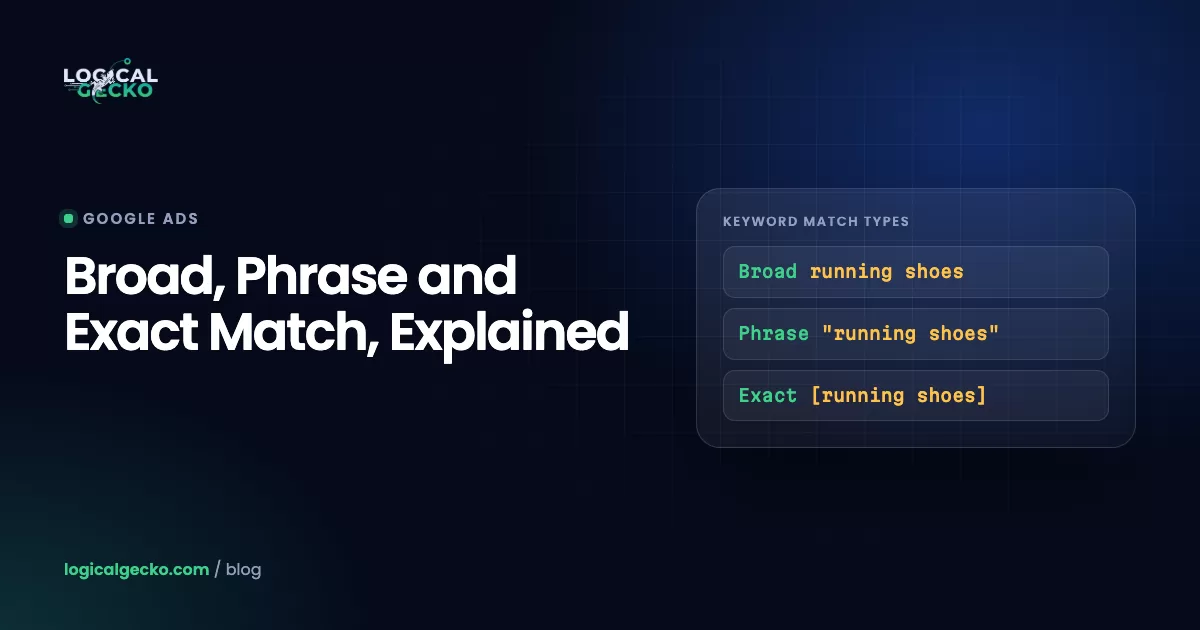
Google Ads has three keyword match types. Broad match (no symbols) can show your ad on related searches, phrase match ("quotes") on searches that include your keyword's meaning, and exact match ([brackets]) on searches with the same meaning. All three also match close variants. Start a new or small account on phrase and exact, and add broad once Smart Bidding has steady conversion data.
Key takeaways
- Google Ads has three keyword match types: broad match (typed plain), phrase match (in quotes) and exact match (in square brackets), and broad match is the default for every new keyword.
- Exact match is not literal in 2026: all match types match close variants such as plurals, misspellings, reordered words, synonyms and searches with the same intent, and Google offers no opt-out.
- Google says Smart Bidding is critical for broad match, so we keep new accounts and campaigns with fewer than about 30 conversions a month on phrase and exact match, and add broad match once conversion data is steady.
- When several of your keywords match one search, Google sends only one to the auction: an identical exact match keyword first, then identical phrase or broad keywords, then the most relevant ad group, then the highest Ad Rank.
- Starting in September 2026, Google automatically upgraded Search campaigns that used the campaign-level broad match setting to AI Max for Search, whose search term matching can show ads on searches none of your keywords contain.
On this page
- What are Google Ads match types?
- Broad vs phrase vs exact match: which searches does each one match?
- How do broad, phrase and exact match work?
- What are close variants, and what does Google treat as the same meaning?
- How does broad match work with Smart Bidding?
- How does AI Max for Search change keyword matching?
- Which keyword enters the auction when several of your keywords match?
- Which match type should you use? A strategy by budget and data
- How do you use the search terms report to choose match types?
- How are negative keyword match types different?
- What happened to broad match modifier?
- Which match type mistakes waste the most budget?
- FAQ
What are Google Ads match types?
Google Ads match types are keyword settings that decide how closely a search must relate to your keyword before your ad can enter the auction. There are three: broad match, phrase match and exact match. You choose one with symbols around the keyword, and broad match is the default when you type no symbols.
A keyword is not the search itself. You bid on the keyword "water heater repair", and people type searches such as "emergency water heater repair in Mesa". The match type decides which of those searches your keyword may cover, and every search it covers is a click you may pay for.
| Match type | How you type it | Google's definition (as of October 2026) | Reach |
|---|---|---|---|
| Broad match | water heater repair | Ads may show on searches related to your keyword, including searches that do not contain its direct meaning | Widest |
| Phrase match | "water heater repair" | Ads may show on searches that include the meaning of your keyword; the meaning can be implied, and the search can be a more specific form of it | Middle |
| Exact match | [water heater repair] | Ads may show on searches that have the same meaning or the same intent as your keyword | Narrowest |
The three overlap. Google says broader match types capture every search the narrower ones reach, plus more: phrase match covers all the searches exact match covers, and broad match covers all the searches of phrase and exact (About keyword matching options). So the same keyword in all three match types inside one ad group adds very little reach.
Match types apply to keywords in Search campaigns. On the Display Network every keyword acts as broad match. Shopping campaigns use no keywords, and Performance Max search themes behave like phrase or broad match keywords.
Broad vs phrase vs exact match: which searches does each one match?
Exact match covers searches with the same meaning as your keyword. Phrase match adds searches that contain that meaning plus other words. Broad match adds related searches that may not contain your keyword at all. Google's own examples show the difference:
| Match type and keyword | Ads may show on | Ads won't show on |
|---|---|---|
| Broad: low-carb diet plan | carb-free foods, low-carb diets, mediterranean diet books, how to cut carbs for beginners, carb-free meals | Google lists no exclusions; broad match covers related searches |
| Phrase: "tennis shoes" | shoes for tennis, buy tennis shoes on sale, red tennis shoes, comfortable tennis sneakers | tennis store, shop for sneakers |
| Exact: [shoes for men] | shoes men, men shoes, men shoe, shoes for a man | mens tennis shoes, shoes for boys |
Source: the example diagrams on Google's keyword matching options page.
The next table applies the same rules to a home-service keyword. It is illustrative: Google decides every match at auction time, so your own search terms report has the final word.
| Search (illustrative) | Exact: [water heater repair] | Phrase: "water heater repair" | Broad: water heater repair |
|---|---|---|---|
| water heater repair | Can match | Can match | Can match |
| repair water heater | Can match (same meaning, reordered) | Can match | Can match |
| water heater repairs | Can match (plural) | Can match | Can match |
| emergency water heater repair | No (adds a meaning) | Can match | Can match |
| tankless water heater repair near me | No | Can match | Can match |
| how to repair a water heater | No | Can match (contains the meaning) | Can match |
| water heater installation | No | No | Can match |
| plumber near me | No | No | Can match |
| water heater for sale | No | No | Can match |
The row that surprises most advertisers is "how to repair a water heater". It contains the meaning of the phrase keyword, so phrase match can show your ad to someone who plans to do the job alone. Negative keywords such as "how to" and "diy" close that gap, as our guide to negative keywords explains.
How do broad, phrase and exact match work?
Each match type trades reach for control. Exact match gives the most control, broad match the most reach, and phrase match sits between them.
Exact match: [keyword]
Exact match shows ads on searches with the same meaning or intent as your keyword, and Google says it gives you "the most steering" over who sees your ad. It is not literal, as the close variants section below shows. Use it for searches you know convert, for brand terms, and for any search you want routed to one ad group and landing page.
Phrase match: "keyword"
Phrase match shows ads on searches that include the meaning of your keyword, with words before, after or around it. Word order still counts when it changes the meaning. In Google's example, the phrase keyword "moving services NYC to Boston" covers "affordable moving services NYC to Boston" and "NYC corporate moving services to Boston", but not a search from someone moving from Boston to New York City. For most small and mid-size accounts, phrase match is the safest default for non-brand keywords.
Broad match: keyword
Broad match shows ads on searches related to your keyword, including searches that lack its direct meaning. To judge what is related, Google also reads three signals: the person's recent search activity, the content of your landing pages and assets, and the other keywords in the ad group. Every keyword typed without symbols is broad match.
Changing a keyword's match type does not change its Quality Score. Google calculates Quality Score from searches that exactly match the keyword, as our Google Ads Quality Score guide explains.
What are close variants, and what does Google treat as the same meaning?
Close variants are searches that are similar to your keyword but not identical, such as misspellings, plurals, reordered words, synonyms and searches with the same intent. All three match types match close variants by default, and Google says there is no way to opt out (Keyword close variants).
| Close variant type | Exact match example (Google) | Phrase match example (Google) |
|---|---|---|
| Closely related spelling: misspellings, singular or plural, stems (floor and flooring), abbreviations, accents | Yes, in every language | Yes, in every language |
| Reordered words with the same meaning | [shoes mens] and [mens shoes] | "red shoes" can show for running shoes red |
| Adding or removing function words (in, to, for, a, the) | [shoes for men] is a close variant of [men shoes] | "hats for winter" can show for winter hats on sale |
| Implied words | [daydream vr headset] can show for daydream headset | "daydream vr headset" can show for daydream headsets for sale |
| Synonyms and paraphrases | [bathing suits] can show for swimming suits | "bathing suits" can show for red swimming suits |
| Same search intent | [images royalty free] can show for free copyright images | "images royalty free" can show for free copyright images of baseball |
The first row works in every language. The other five work in 27 languages, including English and Spanish.
Two practical points follow. First, the search terms report labels these matches. When the search "purple flowrs" triggers the keyword [purple flowers], the Match type column reads "Exact match (close variant)". Second, negative keywords do not stretch the same way. They cover casing and misspellings but not plurals, synonyms or other close variants, so the negative flowers blocks "red flowers" and not "red flower" (About negative keywords).
How does broad match work with Smart Bidding?
Broad match depends on Smart Bidding to decide which of its wider set of searches deserve a bid. Google calls Smart Bidding "critical" for broad match, because every search carries different signals and Smart Bidding sets a separate bid for each one at auction time.
Smart Bidding means the four conversion-based strategies: Maximize conversions, Maximize conversion value, Target CPA and Target ROAS. Since June 2026 Google labels the last two simply "Target CPA" and "Target ROAS"; the bidding works the same (About Smart Bidding). Our guide to Google Ads bidding strategies covers how to pick one.
Google's guide to broad match names two main benefits: broad match reaches relevant searches that phrase and exact match miss, and that wider set gives Smart Bidding more data to find conversions.
The catch is data. Smart Bidding learns from conversions, and Google recommends judging it over a period with at least 30 conversions, or 50 for Target ROAS. Target ROAS on a Search campaign also needs at least 15 conversions in the past 30 days before you can use it (About Target ROAS bidding). A campaign with five conversions a month gives broad match almost nothing to learn from. If conversion tracking counts the wrong action, such as page views or duplicate form fills, broad match learns to buy more of the wrong thing.
Avoid this pairing: we do not run broad match keywords with Manual CPC or Maximize clicks. Neither strategy tells Google which of the extra searches lead to a sale or a lead, so broad match spends on reach alone.
How does AI Max for Search change keyword matching?
AI Max for Search is a set of features you turn on inside a Search campaign, not a new campaign type. Its search term matching goes past your keywords: it uses broad match plus keywordless technology that reads your ads, assets and landing pages, so ads can show on searches that none of your keywords would match (How AI Max for Search campaigns works).
The dates that matter, from Google's April 15, 2026 AI Max announcement (updated June 11, 2026):
- April 2026: AI Max left beta.
- September 2026: Search campaigns using the campaign-level broad match setting were upgraded to AI Max automatically, with search term matching on. Campaigns using automatically created assets got search term matching and text customization. Google expected the upgrades to finish by the end of September.
- February 2027: the sunset and automatic upgrade of Dynamic Search Ads begins, after Google moved it from September 2026.
Broad match keyword
- Starts from a keyword you wrote
- Matches related searches
- Reported as Broad in search terms
- Works with any bid strategy (Google advises Smart Bidding)
AI Max search term matching
- Uses broad match plus keywordless matching from your ads and pages
- Can match searches no keyword covers
- Reported as AI Max, with a source column
- Off with Manual CPC
Five rules from Google's AI Max FAQ and help pages matter for match types:
- Ad group control. Search term matching is on by default when AI Max is on, and you can turn it off for each ad group.
- Bidding. Search term matching does not work with Manual CPC, and Google recommends a conversion or conversion value strategy.
- Negatives still apply. Google confirms that negative keywords are respected with AI Max on.
- Reporting. The search terms report shows "AI Max" as a match type, and a source column says whether a match came from broad match expansion or keywordless matching.
- Priority. AI Max matches share a tier with phrase and broad keywords in Google's priority order. Campaigns upgraded from the broad match setting lose the exact match priority that setting gave their keywords; Google suggests adding exact match copies to keep it (About the broad match keywords campaign setting).
Check this week: open the settings of every Search campaign that used the broad match setting or automatically created assets before September 2026, and confirm whether AI Max is now on and which features run. To test AI Max on a campaign that never had it, run an experiment. If your account is eligible, Google's one-click experiment recommendation splits traffic 50/50 between your campaign and an AI Max version.
Which keyword enters the auction when several of your keywords match?
Only one keyword from your account can trigger an ad for a given search, so your own keywords never bid against each other. Google picks that keyword in a fixed order, and an exact match keyword identical to the search comes first.
Google's prioritization page uses skydiving to explain step 3. For the search "skydiving certifications near me", an ad group about skydiving licenses enters the auction ahead of one about advanced skydiving courses, because "license" is closer in meaning to "certifications". Ad groups built around one theme each make that choice easier for Google.
The order can break when the preferred keyword cannot serve. Google lists these exceptions:
- A keyword with "Low search volume" status, which is inactive
- Disapproved ads or landing pages in its ad group
- Location, audience or other targeting that excludes the person
- A campaign limited by budget
- Other ad formats: Shopping ads can still show beside your exact match ad
- Searches in AI Mode, AI Overviews, Lens or autocomplete, which Google does not treat as identical to any keyword
The practical use: add your best converting searches as exact match keywords in the ad group with the right ad and landing page. That routes them where you want, and it keeps a Search campaign ahead of Performance Max for those exact searches.
Which match type should you use? A strategy by budget and data
Pick match types by how many conversions a campaign produces. Below about 30 conversions a month, phrase and exact match keep spend on searches you chose. With steady, accurate conversions and Smart Bidding, broad match and AI Max have enough data to find more.
Monthly budget ÷ Average CPC × Conversion rateFor example, a garage door company spends $1,500 a month at a $6 average CPC, which buys about 250 clicks. At a 6% conversion rate it gets about 15 conversions a month, half the 30 Google suggests for judging Smart Bidding, so it runs phrase and exact. An online store spending $9,000 a month at $1.50 per click buys about 6,000 clicks; at 2% that is about 120 orders a month, enough to test broad match with Target ROAS. Both examples are illustrative.
| Stage (per campaign) | Conversions a month | Match types | Bidding | What to watch |
|---|---|---|---|---|
| New account, or tracking not yet trusted | 0 to 15 | Phrase and exact | Maximize clicks with a CPC limit, then Maximize conversions once tracking works | Search terms weekly; build negatives |
| Small but steady | 15 to 30 | Phrase and exact; exact copies of proven searches | Maximize conversions or Target CPA | Low search volume keywords; cost per conversion by keyword |
| Growing | 30 to 50 | Add broad match in an experiment beside phrase and exact | Target CPA, or Target ROAS for stores | Search term match type, not keyword match type |
| Established, with conversion values | 50 or more | Broad match for discovery; exact for top terms and brand | Target ROAS or Maximize conversion value | AI Max source column; brand exclusions; negatives |
The thresholds are our working rules, built on Google's 30 and 50 conversion guidance. Three more rules we follow:
- Test broad match as a campaign experiment for at least four weeks, never by switching a whole campaign at once
- Keep brand keywords in their own campaign on exact and phrase match
- Fix conversion tracking before adding any broad match keyword
If you run a small local business, our guide to Google Ads for small business shows the full first-90-days setup that this match type plan fits into.
How do you use the search terms report to choose match types?
The search terms report lists the real searches that triggered your ads, and its Match type column shows how each one matched. Read the search term match type as well as the keyword's match type, because a broad keyword often matches searches in an exact or phrase way.
Google's own example: the broad match keyword purple flowers triggers on the search "purple flowers", and the report labels that search "Exact match" (About the search terms report). A keyword report credits that click to broad match anyway.
- Open the report. Go to Campaigns, then Insights and reports, then Search terms.
- Add the Keyword column. It is hidden by default. Click the columns icon, open Attributes and tick Keyword.
- Pick 30 to 90 days and sort by cost. The costliest rows matter most.
- Read the Match type column. You will see Exact, Phrase and Broad, each with a "(close variant)" label where it applies, and AI Max if that feature is on.
- Segment the keyword view. On the Keywords page, click Segment and choose Search terms match type to see how much of each keyword's traffic came through each match type.
- Act on what you find. Use the table below.
| What you see | What it means | What to do |
|---|---|---|
| A converting search that is not one of your keywords | Demand you are getting by luck | Add it as an exact or phrase keyword in the ad group with the matching page |
| Broad match searches with spend and no conversions | Broad match reaches too far for your data | Add negatives; if they keep coming, change the keyword to phrase |
| A broad keyword whose spend comes mostly from exact or phrase type searches | Broad match is not finding new searches | Credit those results to the searches, not to broad match |
| A close variant with a different intent | Google read the meaning differently from you | Add that search as an exact match negative |
| AI Max rows from keywordless matching with poor results | Your pages and ads are steering matches | Add negatives or URL exclusions, or turn off search term matching in that ad group |
The report leaves out searches that only a few people typed, for privacy. Search terms insights groups those into themes, so check it too before you decide a broad keyword is clean.
How are negative keyword match types different?
Negative keywords use the same three symbols, but they block searches instead of matching them, and they do not expand to close variants. A negative broad match keyword blocks searches that contain all its words in any order, negative phrase blocks the words in that order, and negative exact blocks only that exact search.
They cover casing and misspellings but not plurals or synonyms, so add "job" and "jobs" separately. Our negative keywords guide covers starter lists, levels and the weekly review.
What happened to broad match modifier?
Broad match modifier (BMM) no longer exists as a separate match type. Google began folding its behavior into phrase match in February 2021, and since July 2021 you cannot create new keywords with the plus sign notation, such as +moving +services (About changes to phrase match and broad match modifier).
Old BMM keywords still run, and they behave exactly like phrase match. A keyword that had the plus sign on only some words now acts as full phrase match. If you edit the text of an old BMM keyword, Google converts it to quotes when you save. Any Google Ads guide that still tells you to add plus signs is out of date.
Which match type mistakes waste the most budget?
Four habits cause most of the match type waste we find, and each takes minutes to check:
- Keywords with no symbols by accident. A keyword pasted without quotes or brackets runs as broad match, often on Manual CPC or Maximize clicks.
- Judging broad match by the keyword report. Broad keywords pick up exact and phrase type searches, which flatters their results.
- Auto-applied broad match. The Add broad match keywords recommendation can be set to auto-apply and change match types without anyone approving it (About applying recommendations automatically).
- Missing the AI Max upgrade. Campaigns that used the broad match setting before September 2026 can now match searches none of their keywords contain.
Our Google Ads audit checklist covers match types, search terms and negatives alongside tracking and bidding. If you want a second opinion on your own account, a free Google Ads audit tells you whether we found what is pushing your cost per conversion up. If you would rather hand the weekly search terms work off, see how Logical Gecko manages Google Ads for online stores and home-service businesses.
Frequently asked questions
Which match type is best for Google Ads?
No single match type is best for every account. Phrase and exact match work best for new accounts, small budgets and campaigns with fewer than about 30 conversions a month, because you control which searches you pay for. Broad match works best with Smart Bidding and steady, accurate conversion tracking, because the bidding needs data to judge its wider set of searches. Most mature accounts mix all three.
Does phrase match still exist in Google Ads?
Yes. Phrase match is one of the three keyword match types in Google Ads as of October 2026, set by putting the keyword in quotes. In 2021 Google folded broad match modifier into phrase match, so phrase match now shows ads on searches that include the meaning of your keyword, even when the words are reordered or the meaning is implied, as long as the order does not change the meaning.
What is an example of a broad match keyword?
A broad match keyword is any keyword typed without quotes or brackets. Google's own example is the broad match keyword low-carb diet plan, which may show ads on searches for carb-free foods, low-carb diets, mediterranean diet books, how to cut carbs for beginners and carb-free meals. Several of those searches do not contain the words of the keyword, which is how broad match differs from phrase and exact match.
What are the benefits of using broad match?
Broad match has two main benefits, according to Google. It reaches more relevant searches than phrase and exact match, including ones you would not think to add as keywords, and it gives Smart Bidding more data and flexibility to find conversions. Google also says broad match reads extra signals to keep matches relevant: the person's recent searches, your landing pages and assets, and the other keywords in the ad group.
Do match types affect Quality Score?
No. Google calculates Quality Score from past impressions on searches that exactly match your keyword, so changing a keyword from phrase to broad or exact does not change how its Quality Score is calculated. A broader match type can still help a low-volume keyword get a score, because it enters more auctions and gathers more data on those exact searches.
Should you add the same keyword in all three match types?
Usually not in the same ad group. Google says broader match types already cover every search the narrower ones reach, and only one of your keywords can enter the auction for a search. Adding an exact match copy of a proven search is useful when you want it routed to a specific ad group, because an identical exact match keyword gets first priority over phrase, broad and Performance Max.
Can exact match keywords show for searches with different words?
Yes. Exact match covers searches with the same meaning or intent as your keyword, and is not limited to the identical words. Google's examples include the exact match keyword [bathing suits] showing for swimming suits, and [images royalty free] showing for free copyright images. Exact match will not show for a search that adds a new meaning, such as mens tennis shoes for the keyword [shoes for men].
What is the symbol for each Google Ads match type?
Broad match has no symbol: you type the keyword plain, such as water heater repair. Phrase match uses quotation marks, such as "water heater repair". Exact match uses square brackets, such as [water heater repair]. The old plus sign for broad match modifier no longer works for new keywords. Negative keywords use the same three formats.
Sources16 references
- Google Ads Help: About keyword matching options
- Google Ads Help: Google Ads keyword matching
- Google Ads Help: Keyword close variants: Definition
- Google Ads Help: About ad group and asset group prioritization within a Google Ads account
- Google Ads Help: Your guide to broad match
- Google Ads Help: About the broad match keywords campaign setting
- Google Ads Help: How AI Max for Search campaigns works
- Google Ads Help: Frequently asked questions about AI Max for Search campaigns
- Google Ads & Commerce Blog: We're upgrading Dynamic Search Ads to AI Max (April 15, 2026, updated June 11, 2026)
- Google Ads Help: About the search terms report
- Google Ads Help: About changes to phrase match and broad match modifier
- Google Ads Help: About negative keywords
- Google Ads Help: About Smart Bidding
- Google Ads Help: About Target ROAS bidding
- Google Ads Help: About Quality Score for Search campaigns
- Google Ads Help: About applying recommendations automatically

Safeer leads strategy at Logical Gecko, a Google Partner and Shopify Partner agency that runs Google Ads for eCommerce and home-service brands and recovers suspended Merchant Center accounts. Everything in these guides comes from work on live client accounts. More about the team.